Can DNS Filtering Stop Tracking? What It Can and Cannot See
See which tracking connections DNS filtering can block, what a DNS lookup reveals, and which browser privacy controls address the gaps it leaves.

Written by
DNSAdBlocker Team
The DNSAdBlocker team explains home DNS filtering, setup, and maintenance using product documentation and referenced platform guidance.
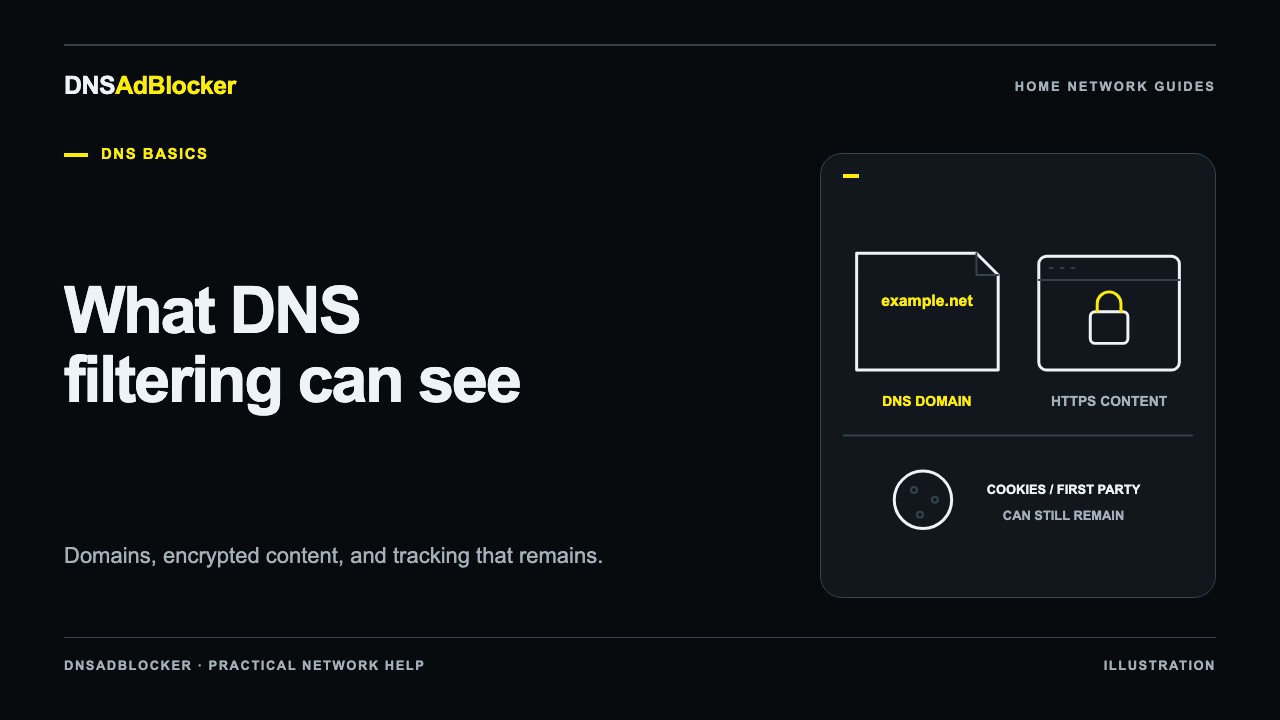
DNS filtering can stop some tracking connections when a device asks for a listed tracking domain through the filter. It cannot stop every way a website or app recognizes you. Cookies, account sign-ins, browser fingerprinting, and tracking sent through a domain needed for the service can remain.
That distinction matters when a dashboard shows hundreds of blocked requests. The count tells you that lookups were blocked. It does not tell you that tracking has ended, how many companies tried to identify you, or whether you are anonymous.
What blocking a tracking domain changes
A website may load its own content and also contact another domain for analytics. If the analytics name is on your DNS blocklist, the filter can prevent its normal resolution. The browser or app then cannot establish that connection using that answer.
This can reduce some background requests without installing an extension in every compatible client. The same principle can apply to an app that follows your home DNS settings. The DNS ad-blocking explainer walks through the lookup itself.
But the filter needs a useful boundary to block. If a site sends analytics to its own essential domain, DNS cannot permit the article or account page while rejecting only the analytics URL at that same name. Blocking the whole domain could stop the service you wanted to use.
Nor does a DNS rule remove existing information. A site may already have a cookie, an account identifier, or a record of previous visits. Preventing one later connection does not delete those records. Privacy controls need to match the mechanism involved.
| Tracking mechanism | What DNS filtering may do | What it leaves to another control |
|---|---|---|
| Separate listed tracking domain | Prevent its lookup through the filter | Existing records and connections through other paths |
| Cookies used by the site you visit | Block a separate domain involved, if present and listed | Cookie storage, site sign-in, and the site's own requests |
| Tracking sent to an essential first-party domain | Little selective control at the DNS layer | Browser controls and the service's privacy choices |
| Browser fingerprinting | Block a separate script host if listed | Scripts and identifying signals on allowed domains |
None of these rows establishes how often a particular site tracks visitors. They explain where the DNS decision can apply.
A DNS name is different from an HTTPS page URL
Consider this illustrative address:
https://shop.example.com/orders/receipt?order=123
A normal DNS lookup asks about the hostname, shop.example.com. It does not send /orders/receipt?order=123 as part of that DNS query. The query also does not contain the page's text, a message body, or the contents of a shopping basket.
HTTPS protects the content exchanged between the browser and the HTTPS service in transit. A DNS filtering device does not gain access to that content merely because the browser uses it for name lookups.
Domain names can still reveal sensitive information. A query may suggest interest in a particular service or organization. Its meaning depends on context: background apps, shared networks, cached answers, and embedded third-party resources all complicate the assumption that one lookup equals one deliberate page visit. IETF RFC 9076 discusses these privacy risks in detail.
The operator of a DNS resolver is therefore part of the privacy decision. Ask what it receives, what it logs, how long it keeps information, and where it sends allowed requests. Our local DNS versus cloud DNS guide compares those responsibilities.
What “local” does and does not tell you
A home filter makes its blocking decision on your local network. Allowed queries can still leave the device for an upstream resolver. The upstream service's policy and the transport used for those queries remain relevant.
For the Home DNS Ad Blocker, do not assume end-to-end encrypted DNS or a wholly on-device resolution process. Its local dashboard exposes aggregate blocked and allowed request counts and observed-client counts. It does not provide a full browsing-history report or a domain-by-domain query log. Router forwarding can also make several household devices appear as one DNS client.
Keeping a device at home is one architectural choice. It is not, by itself, a complete statement about privacy, logging, or encryption. Check the product guide for what the supplied device actually controls, and keep its local dashboard on your trusted home network.
Combine DNS filtering with browser privacy controls
Start by naming the problem you want to reduce. If the concern is third-party cookies, review your browser's cookie and tracking settings. If the concern is advertising scripts and page clutter, a reputable, supported browser extension may provide controls at the request and page-content level. If the concern is a service's account history, use that service's privacy and deletion settings.
DNS and browser tools can complement each other because they have different visibility. The DNS versus browser extension comparison explains the practical coverage across browsers, apps, and televisions.
Check the browser's resolver path as well. A browser configured to use an external Secure DNS provider may send lookups around a local filter. Encryption protects a DNS connection's contents in transit; it does not make two different resolver choices equivalent. Read how Secure DNS can bypass local filtering before changing settings, and choose the resolver path deliberately.
A workable household check is to confirm that an intended client's requests reach the filter, verify a known listed domain is blocked, and make sure ordinary tasks still work. Review browser controls separately. Avoid a single “privacy score” that turns all these different mechanisms into one unexplained number.
Does a DNS filter replace a VPN?
No. A DNS filter decides how to answer domain lookups. A VPN routes covered network traffic through a tunnel to a VPN endpoint. Their privacy implications, operators, and failure modes differ. A VPN can also supply its own DNS configuration and bypass a local filter.
Neither tool makes account sign-ins anonymous to the service you use. Choose each for a specific job, understand who handles the traffic, and assess the combination rather than assuming more enabled tools always means better privacy.
Sources
- IETF RFC 9076: DNS Privacy Considerations, on domain-query visibility, resolvers, and privacy limits.
- MDN: Using HTTP cookies, including state, tracking, and privacy controls.
- Google Chrome Help: manage safety and security, including Secure DNS and custom resolver behavior.
- MDN: WebExtensions webRequest API, explaining the request-level capabilities available to browser extensions.
Questions or corrections about this content can be sent to support@dnsadblocker.com.
All postsRelated posts
DNS filtering guides, home network setup notes, and product updates.